

Everything ClassRoots does, with an honest badge on each.
Live is on production today. Where a live row says you switch it on, it is a setting in your portal, and the row names it. Per school, on request is something we set up for your school. Beta is live and still being shaped.
Everything your school needs. In one app.
Built for everyone in the school ecosystem.
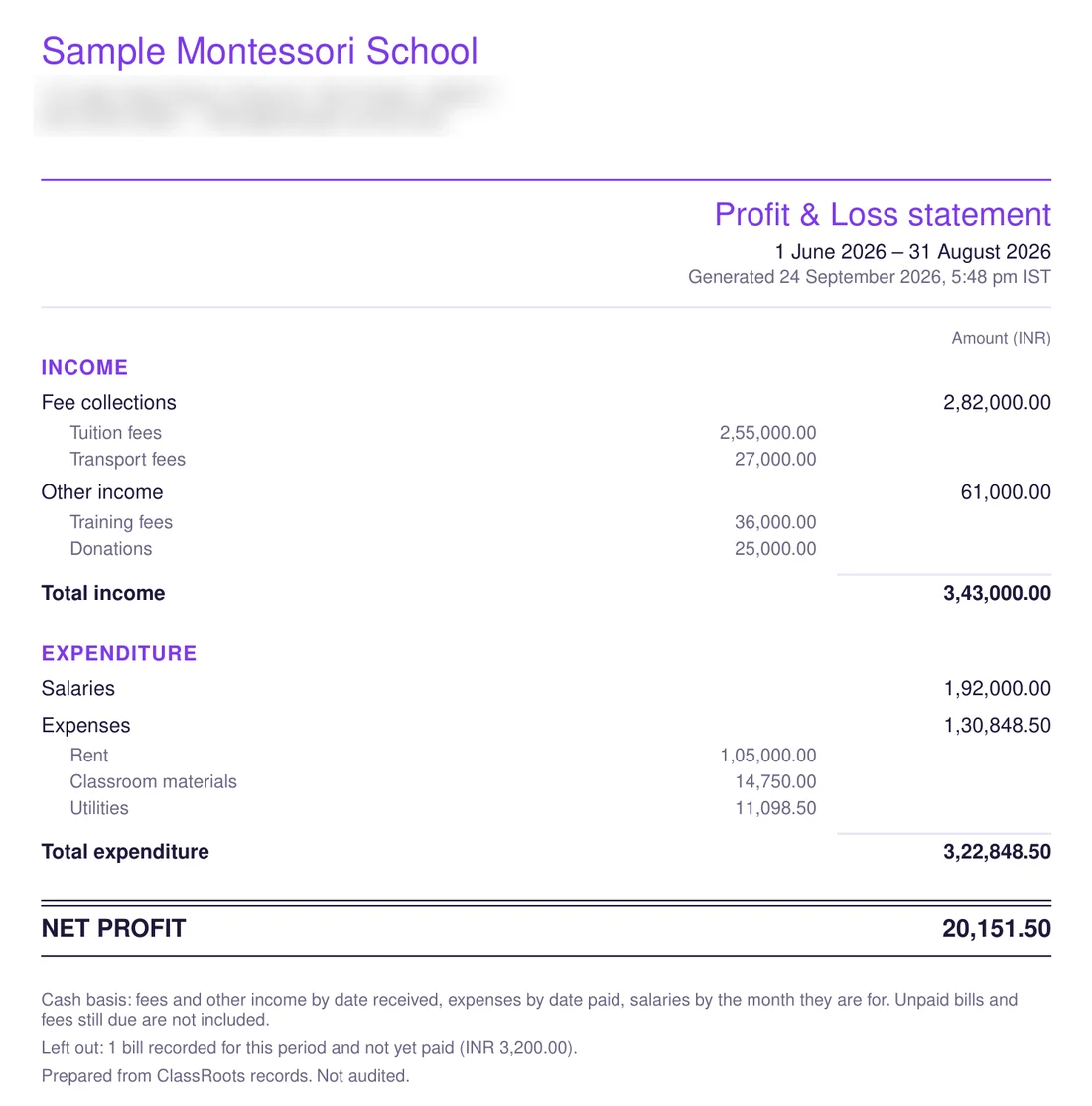
The P&L statement — a PDF on your letterhead, shown with sample school data.
Monthly P&L — on screen and on paper
LiveFees and other income, minus salaries and expenses, month by month with a 12-month trend. Download a statement for any month, quarter or financial year — a PDF on your letterhead, or Excel for your accountant. Cash basis, marked “not audited”.
Run payroll + leave policy
LiveRecord the month's salaries for every teacher in one tap (Bulk Pay), with auto-calculated unpaid-leave deductions — the money itself goes through your bank. School-wide policy + per-staff overrides, and school holidays are skipped when leave and salary are counted.
Admissions funnel + online application form
LivePipeline stages, source tags, follow-ups, school visits and one-click admit. Switch on your own online form — your questions, the documents you need (birth certificate, photo, last report card), a standard or early-years template — and each new enquiry reaches the principal's phone the moment a family sends it.
Fee tracking + receipts
LiveEvery fee tracked — cash, cheque, transfer or UPI. Parents can pay your school's own UPI ID and share the screenshot; your office confirms in one click and the receipt goes out in your own numbered series. Concessions and waivers built in. In-app card and net-banking payment is set up per school, on request.
Fee reconciliation + Tally export
LiveDoes the register match the money? Day-wise collection split by cash / UPI / cheque / online, reference numbers, who recorded each entry — as CSV, or as a TallyPrime import file of fee and other-income receipts for your accountant.
Expenses with invoice number + GSTIN
LiveCategories set up for your kind of school. Record the supplier's invoice number and GSTIN — checked for typos by format and check character — in the portal, or photograph the bill on the principal's phone and let the form fill itself.
Fees for exactly the right children
LiveBus routes, clubs, labs, optional fees: bill a list of students instead of a whole grade — paste admission numbers, preview, confirm. Late fees come from a list your office reviews, never an automatic fine.
Certificates in one click
LiveBonafide, conduct, study and transfer certificates on your own letterhead — serial-numbered into a permanent register, exactly how a TC register should be kept.
AI report-card remarks
LiveYour teachers write 40 remarks per class per term. ClassRoots drafts a personalised remark for every student from their real marks — the teacher edits and approves, and it prints on the report card.
Substitute finder
LiveTeacher called in sick at 8:15? See who's actually free in each of her periods — ranked by who teaches that subject — assign in one tap, and the substitute gets notified on their phone.
Smart fee chasing
LiveAutomatic 4-step reminder ladder for every outstanding fee with a due date — 3 days before it, on the day, and at 7 / 14 days overdue — whether or not you collect online. Stops the moment the parent reports the payment.
Auto-generated payslips
LiveClassRoots generates a payslip PDF on your letterhead the moment you record a salary payment. Staff download it from their app — no more chasing the office.
Staff attendance register
LiveA day view and a monthly muster roll you can edit and export as CSV, with leave and holidays marked. If you want it: staff tap “I'm in” on the staff app, with per-person reporting times and an optional location check that keeps only the distance, never the position.
Set up the way your school runs
LiveSwitch off what you don't use — attendance, timetable, homework, exams, leave, pickup — and it disappears for staff and parents. Paste your holiday list once and families and staff are reminded the day before. Decide whether a parent's leave request needs approval — always, only for longer leaves, or never.
Roles, access and oversight
LiveA Correspondent role above the principal, and a Roles & access grid that decides which role sees which module. Oversee parent–teacher chat: hide a message, mute a thread, or turn chat off for a class.
Year-end roll-over wizard
LivePromote every class to the next grade with one click. Carries forward students, archives the old year, sets up the new academic session cleanly.
Build any report — by dragging, or just asking
LiveDrag-and-drop fields, start from a template, or type your question in plain English. Configure charts, group by two dimensions at once (say class × month), download as PDF or Excel, and every report respects who's allowed to see what.
Open parent-teacher meetings, per class
LiveSet the date, the time window and the 15-minute slot length. Parents book themselves; teachers get the schedule; you watch it fill up — no spreadsheets, no phone tag.
ClassRoots Help AI for principals
LiveFloating AI assistant inside the portal. Ask 'how do I run payroll' or 'where do I add a new staff member' — it answers in plain English from the ClassRoots help knowledge base.
Morning Pulse — your daily AI brief
LiveSwitch Insights on in Settings and each morning the portal surfaces what needs you: attendance dips, fee-collection lag, parent requests waiting too long, low-read circulars — computed overnight from your own data. No dashboards to dig through.
One connected ecosystem.
Three apps. One source of truth. Every action in one app flows to the next — no copy-paste, no chasing, no “did you see my message?”
Leave approval — instant, traceable
- 1Parent AppSubmits leave request for Aadhya
- 2Staff AppPrincipal gets notified, taps Approve — or it is noted at once, if your school chose that
- 3PortalAdmin sees it logged — status, dates and the review note — and can export the lot as CSV
Fee paid → reported → confirmed
- 1Parent AppPays the UPI ID the school added in Settings and shares the screenshot — the fee shows Reported, its reminders stop
- 2PortalOffice sees the screenshot beside what was read from it, and confirms in one click
- 3Parent AppA numbered receipt arrives — and the payment is in the P&L and the Tally export
Voice circular → two languages → tracked
- 1Staff AppPrincipal records a 30s voice note in Tamil
- 2AITranscribes it and drafts the circular in Tamil and English, auto-categorised
- 3Parent AppPrincipal checks and publishes; every parent reads it in Tamil or English, with read receipts
Attendance synced, parents notified
- 1Staff AppTeacher marks attendance in 30 seconds
- 2SystemAbsent parents auto-notified via push
- 3PortalDaily / monthly attendance reports live
Admission form → principal's phone → a call back
- 1WebA family fills your online admission form (once you switch it on), with the documents you asked for
- 2Staff AppPrincipal's phone buzzes; the enquiry opens with every answer
- 3Staff AppWhatsApp or call the family in one tap, then mark it contacted — the portal takes it from there
Bill → expense → P&L statement
- 1Staff AppPrincipal photographs the supplier's bill
- 2AIAmount, shop, invoice number, GSTIN and date are filled in — the principal checks and saves
- 3PortalThe expense, with its bill attached, is in the month's P&L and the downloadable statement
Where we're going. Out in the open.
No vapourware. Live items work today — a few are switches your school turns on in Settings. Coming next is what we are building or proving now; triggered items wait for a school that needs them.
- •Voice → Circular (speak Tamil, review a draft in Tamil + English, publish)
- •Voice → Homework + Voice → Daily log — dictate in any Indian language
- •Circular Studio — 16 designed templates, WhatsApp-ready image export
- •Auto-translate circulars between Tamil and English
- •Circular composer with multi-class targeting + read receipts
- •Parent ↔ class-teacher 1:1 messaging (per child), with principal oversight — hide, mute, or turn chat off per class
- •Moments — privacy-aware class photo feed with staff moderation
- •Absence → parent loop: absent alert in a minute, one-tap reply files the leave note
- •Holiday calendar — paste the list once, families and staff reminded the day before
- •Pay by UPI to the school's own UPI ID — parent shares the screenshot, the office confirms, then the receipt
- •Payment screenshots read by AI for the office to check — never marked paid by AI
- •Owner P&L dashboard + downloadable P&L statement (PDF on letterhead, Excel)
- •Tally export — TallyPrime import file of fee and other-income receipts
- •Receipt numbers in the school's own series — prefix, starting number, gap-free per year
- •Smart fee reminders — 4-step ladder for every unpaid fee with a due date, online or not
- •Fees billed to exactly the right students — bus routes, clubs, optional fees
- •Late fees from a list the office reviews
- •Expenses with invoice number + GSTIN check — from the portal or the principal's phone
- •Scan a bill into an expense (staff app)
- •Other-income register with its own receipt series
- •Bulk-pay payroll + auto-calculated leave deductions
- •Payslip and receipt PDFs on the school's letterhead
- •Fee reconciliation register — day-wise, split by cash / UPI / cheque / online, CSV export
- •Certificates — bonafide / conduct / study / TC on your letterhead, serial-numbered register
- •Concession workflow
- •Time-table v2 with auto-scheduler
- •Substitute finder — free-teacher solver, one-tap assign, push to the substitute
- •Exams + auto-ranked report card PDFs
- •AI report-card remarks — drafted per student, teacher approves
- •Early-years daily log — meals, naps, mood, parent notes
- •Weekly learning log for Montessori + early years — your own learning areas, voice dictation, PDF
- •Homework + photo submissions + grading
- •Attendance + auto-notify absent parents
- •AI report builder — drag-drop + templates + ask-in-English, 2-dimension group-by, role-scoped
- •Admissions funnel + online admission form with documents and your own questions (switch on)
- •Admission enquiries on the principal's phone, the moment they land
- •Staff attendance register + muster roll; optional “I'm in” check-in
- •Principal's “attendance today” and “staff today” on the phone
- •Module switches — turn off what your school doesn't use
- •Year-end roll-over wizard
- •Pickup + leave + late-arrival approval workflows
- •Parent-teacher meeting (PTM) booking — principal opens slots, parents self-book
- •Student photos with a per-child “no photo consent” switch
- •Parent app (iOS + Android, multi-school / multi-kid)
- •Staff app (Teacher / Principal / Staff role tabs)
- •Push notifications across every app event
- •AI parent assistant (RAG-based, grounded in school data)
- •ClassRoots Help AI for principals (inside portal)
- •Morning Pulse — nightly AI brief for principals (switch on)
- •“For you” class signals for teachers — with ready-to-send draft messages (switch on)
- •Parent “For you” digest — gentle updates about each child (opt-in)
- •One switch turns every AI feature off — enforced on the server
- •Role-based access — Correspondent role + a Roles & access grid
- •Owner Command Center (morning ritual dashboard)
- •In-app fee payment by UPI / card / net banking, settling to the school's own bank (Razorpay Route) — switched on per school
- •Bus boarding register — staff tap children on and off, works offline, no GPS
- •Fee reminder timings a school can set, per fee
- •School-brand colours + logo on Circular Studio templates
- •ID cards + exam hall tickets (same one-click machinery as certificates)
- •Per-category notification mutes for staff
- •Multi-language UI beyond circulars (Tamil/Hindi for app shell)
- •WhatsApp Business — outbound circulars + 2-way replies (when API approval lands)
- •Multi-school chains — one login across branches (when a chain signs)
- •Deeper accounting — vendor ledgers and GST returns (expenses already carry supplier, invoice number and GSTIN)
- •ROI dashboard — 'ClassRoots saved you X hours / ₹Y' (3 months of pilot data)
- •Chat moderation v2 — in-app report button (shaped by pilot feedback)